How To Add Retry Logic for File Upload Failures

When file uploads fail, the right retry strategy can save users from frustration. Network glitches, server timeouts, or rate limits are often temporary issues that resolve quickly. Adding retry logic with exponential backoff and jitter ensures your app can manage these failures effectively without overwhelming servers. Here's a quick breakdown:
- Retry Transient Errors: Issues like 5xx server errors, rate limits (429), or timeouts (408) are temporary and benefit from retries.
- Avoid Retrying Permanent Errors: Errors like invalid file formats (400), authentication failures (401/403), or missing resources (404) require user intervention or fixes.
- Exponential Backoff: Space out retries (e.g., 1s, 2s, 4s) to give servers time to recover. Add randomness (jitter) to avoid simultaneous retries.
- Set Limits: Cap retries (3–5 attempts) and respect server-provided
Retry-Afterheaders to prevent excessive delays. - Chunked Uploads: For large files, retry only the failed parts to save time and resources.
Understanding File Upload Failures
File upload failures can range from quick, self-resolving issues to persistent problems that demand manual intervention. The challenge lies in identifying the type of error to ensure your retry logic improves reliability without wasting resources.
Transient vs. Permanent Errors
Transient errors are short-term disruptions that often resolve with retries. These include issues like network interruptions, server overloads, rate limiting, or DNS hiccups. For these, retry strategies like exponential backoff can be highly effective.
"Responses related to transient problems are generally retryable. On the other hand, response related to permanent errors indicate you need to make changes, such as authorization or configuration changes, before it's useful to try the request again." - Google Cloud Storage Documentation
Permanent errors, on the other hand, stem from deeper issues in the request itself. Examples include invalid file formats, authentication problems, oversized files, or missing resources. Retrying in these cases won’t help; instead, you’ll need to notify the user or fix the underlying problem before attempting the upload again.
Here’s a quick breakdown:
| Error Category | Examples | Should You Retry? |
|---|---|---|
| Transient | Socket timeouts, TCP disconnects, server overload (5xx), rate limiting (429), request timeout (408) | Yes – use exponential backoff |
| Permanent | Invalid file extension, unauthorized access (401/403), file too large, bad request (400), not found (404) | No – inform the user or fix the issue |
A notable example occurred in June 2024, when the feature flagging platform Hypertune experienced an outage due to improper retry logic. It retried all 5xx status codes without checking if the original request had succeeded, leading to duplicate orders when requests timed out at the load balancer but were successfully processed by the server.
These error types often appear in common failure scenarios, as outlined below.
Common Failure Scenarios
Some frequent causes of file upload failures include:
- Network Timeouts: Large files (100 MB+) on low-bandwidth connections can trigger server timeouts, sometimes within 30 seconds.
- Server Overload: A 503 Service Unavailable error signals that the server needs time to recover from high demand.
- Rate Limiting: When a server hits its request quota (429 Too Many Requests), the issue is typically temporary, especially if the
Retry-Afterheader is followed. - Filename Issues: Special characters like &, !, or # in filenames can cause compatibility problems across platforms.
- Authentication Failures: Errors like 401 or 403 mean that credentials or permissions must be updated.
Another issue arises when a computer enters sleep or hibernate mode during a large upload. This disrupts the data transfer, causing the server to terminate the connection. While it mimics a network error, disabling sleep mode can help prevent it.
Google Cloud’s client libraries highlight the importance of carefully configured retry logic. For instance, the gcloud CLI defaults to 32 retry attempts for transient errors, while the Java client library uses 6 attempts, and Node.js, Ruby, and PHP libraries typically default to 3. These differences reflect the balance between ensuring reliability and conserving resources.
Tailoring retry logic to these scenarios ensures that failures are managed effectively and resources are used wisely.
Implementing Retry Logic with Exponential Backoff
After identifying errors that can be retried, the next step is to use exponential backoff to strike a balance between persistence and server stability. Here's how this approach works and why it's effective.
What Is Exponential Backoff?
Exponential backoff is a retry strategy where the delay between each attempt increases exponentially rather than staying the same. The formula is straightforward: delay = baseDelay × 2^(attemptNumber). For example, with a 1-second base delay, retries would occur after 1, 2, 4 seconds, and so on.
This method helps avoid the "thundering herd" problem, where a flood of simultaneous retries can overwhelm a server. Instead of hammering a struggling service with repeated requests, exponential backoff allows the system to recover from temporary issues.
"Exponential backoff is a retry strategy that increases the wait time between retries exponentially to reduce load and collisions." - SRE School
It’s also resource-efficient. During short outages, immediate retries can waste computing power, network bandwidth, and connection slots. A well-designed system should aim for a retry success rate above 70% for transient errors, with less than 2% of user-facing requests requiring retries.
To improve this strategy further, you can add jitter, which introduces randomness into the delay. A common approach is full jitter, where the delay is randomized between 0 and the calculated exponential backoff time. This spreads retries more evenly and reduces the chance of simultaneous requests.
Setting Maximum Delays and Retry Attempts
While exponential backoff is effective, it’s important to set limits to avoid excessive delays. Without constraints, delays can grow too long to be practical. For instance, with a 1-second base delay, the fifth retry results in a 16-second wait, and by the tenth retry, the delay exceeds 17 minutes.
To prevent this, set a maximum delay cap, typically between 30 and 60 seconds. Limiting the number of retries is equally important. A common guideline is 3–5 retries, which translates to about 31 seconds of total retry time with a 1-second base delay. This timeframe is usually sufficient for resolving short outages without masking more serious issues.
The ideal base delay depends on the use case. For interactive API calls, a base delay of 1–2 seconds is usually appropriate. For longer-running tasks, like file uploads, a 30-second base delay might work better. Additionally, always respect the Retry-After header in responses like HTTP 429 (Too Many Requests) or 503 (Service Unavailable). Ignoring this header can lead to penalties from the server.
To simplify implementation, consider using libraries designed for retry logic. For instance:
- Python:
tenacity - Node.js:
axios-retry - JavaScript:
p-retry
These tools handle details like jitter and the Retry-After header automatically, saving you time and effort.
Detecting Errors Suitable for Retry
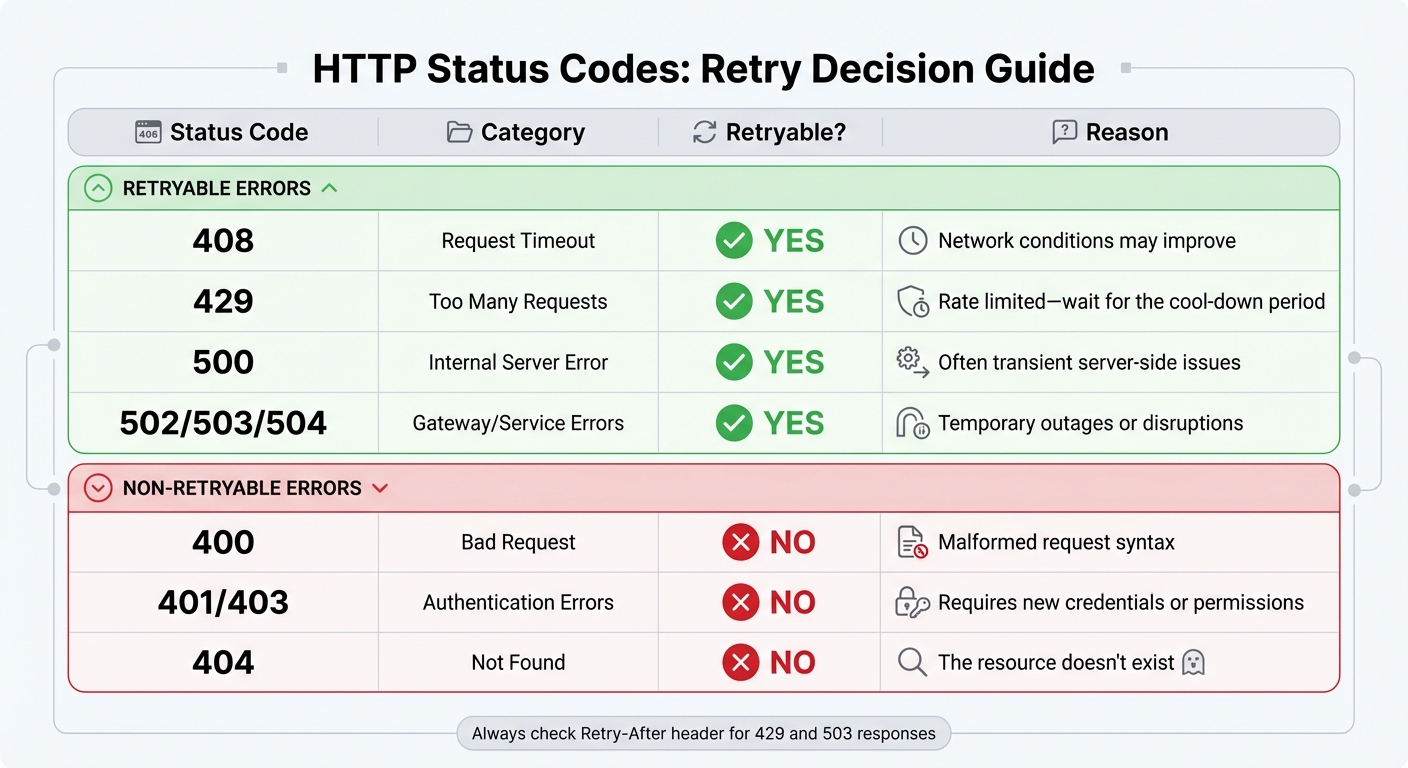
HTTP Status Codes Retry Decision Guide for File Uploads
Identifying which errors are worth retrying and which demand immediate attention is a critical part of ensuring reliable file uploads. Proper error classification helps avoid wasting resources on unnecessary retries.
"Error classification is fundamental - correctly distinguishing transient from permanent errors prevents wasted retries." - Paduma, Full-Stack Engineer
Transient errors - like network timeouts, server overloads, or rate limiting - are often short-lived and justify retrying. On the other hand, permanent errors, such as malformed requests or missing authentication, signify deeper issues that require fixing the request itself before any retry attempt.
Handling HTTP Status Codes
HTTP status codes are a reliable guide for deciding whether to retry a request. Most server-side 5xx errors (e.g., 500, 502, 503, 504) are temporary and can typically be retried.
Certain 4xx errors also justify retries under specific conditions. For instance:
- 408 (Request Timeout): This reflects a delay in server response, suggesting that retrying might succeed.
- 429 (Too Many Requests): Indicates rate limiting. In this case, check the
Retry-Afterheader to determine when it’s safe to try again.
Here’s a quick guide to common status codes and their retry potential:
| Status Code | Category | Retryable? | Reason |
|---|---|---|---|
| 408 | Request Timeout | Yes | Network conditions may improve |
| 429 | Too Many Requests | Yes | Rate limited - wait for the cool-down period |
| 500 | Internal Server Error | Yes | Often transient server-side issues |
| 502/503/504 | Gateway/Service Errors | Yes | Temporary outages or disruptions |
| 400 | Bad Request | No | Malformed request syntax |
| 401/403 | Authentication Errors | No | Requires new credentials or permissions |
| 404 | Not Found | No | The resource doesn't exist |
Beyond status codes, error messages can provide additional clues about whether a retry is appropriate.
Interpreting Error Messages
Network-level errors without an HTTP response often point to transient issues. For example, connection errors like ETIMEDOUT, ECONNREFUSED, ECONNRESET, or unexpected connection closures suggest that retrying might work. Similarly, DNS lookup failures (e.g., EAI_AGAIN) are usually temporary.
Pay close attention to responses that include a Retry-After header, especially in 429 or 503 errors. This header specifies exactly when to retry, eliminating the need for arbitrary backoff intervals. Additionally, messages such as "temporary timeout" or "service temporarily unavailable" are strong indicators that retrying could be effective.
Finally, confirm that the operation is idempotent. For instance, retrying a PUT request (which replaces an existing file) is generally safe. However, retrying a non-idempotent POST request (which creates a new resource) could lead to duplicate uploads.
Best Practices for Retry Logic
When dealing with errors, it's crucial to ensure your retry logic targets only the failures that can be addressed. Effective retry mechanisms rely on careful validation, proper state handling, and consistent monitoring to prevent wasted resources or duplicate uploads.
Pre-Validation of Files
Before retrying, confirm that the failure is worth addressing. Some 4xx errors indicate fundamental issues with the request, which must be corrected before any retry attempt.
"Retry is not a magic shield. Retry is a weapon. Point it wrong - you kill your own system."
- Mohammad Shoeb, .NET Full Stack Solution Architect
Check for common issues like file size limits, format restrictions, and content integrity. Only include files that encountered errors in the retry process. Once validation is complete, adjust file pointers and states to ensure retries proceed smoothly.
Managing File State During Retries
When retrying, reset the file pointer or reload the file stream to re-send the entire file. Relying on client-side progress indicators, such as xhr.upload.onprogress, can be misleading because they track data sent from the browser, not what the server receives.
For chunked uploads, query the server to determine the startByte or the last successfully received chunk index before resuming. Use tools like Blob.slice() in JavaScript or RandomAccessFile.setPosition() in mobile environments to resend only the missing sections. To safeguard against interruptions, store upload metadata - such as upload IDs, completed chunks, and checksums - in persistent storage like IndexedDB for browsers or SQLite for mobile/desktop environments.
"Strong tip: always send the part checksum with the upload and have the server verify before marking the part complete. Never trust part completion without a checksum match."
Proper state management ensures retries are efficient and minimizes the risk of errors, laying the groundwork for effective monitoring.
Monitoring and Logging Retry Behavior
Monitoring retries is essential for troubleshooting and improving the overall reliability of your system. Log each retry attempt with details like operation name, timestamp, duration, HTTP status code, and error message. Avoid vague error messages by capturing specifics such as request IDs and cloud provider error codes (e.g., SlowDown or ServiceUnavailable) for easier cross-referencing with support logs.
Track success rates, error types, and latency metrics to detect performance issues early. For instance, production systems should alert you if the success rate for storage operations drops below 99.9% or if average response times exceed 1,000 ms. Keep an eye on ingress metrics to identify whether repeated retries of large files are causing unexpected spikes in data transfer and costs. If retries ultimately fail, ensure logs trigger cleanup actions, like AbortMultipartUpload, to avoid unnecessary storage costs for incomplete files.
Conclusion
Adding retry logic to file uploads makes your application more dependable. By recognizing the difference between temporary issues (like HTTP 429 or 503 errors) and permanent ones (such as HTTP 400 or 404), your app can decide when retrying is worthwhile, avoiding wasted effort on retries that are destined to fail.
At the heart of a solid retry strategy is exponential backoff with jitter. This technique allows overloaded servers to recover while reducing the chance of overwhelming them with a flood of retries. Studies indicate that well-implemented retry mechanisms can improve perceived app reliability by up to 40%. Limiting retries to 3–5 attempts in most cases prevents masking permanent issues, and honoring server-provided Retry-After headers ensures better relationships with API providers.
To take it a step further, pre-validate files, use persistent storage to track upload progress, and log retry attempts for quick troubleshooting. These practices combine to create a system that can handle temporary issues like network hiccups or server overloads with ease. By applying these strategies, you can build a resilient upload process that recovers smoothly from transient errors.
FAQs
What retry delay settings work best for uploads?
The best approach for retry delay settings during uploads is to use exponential backoff. Start with a short delay, like 1 second, and double it with each retry (e.g., 1 second, 2 seconds, 4 seconds). Keep the number of retries between 3 and 5 to avoid overloading the server. This method strikes a balance by ensuring retries happen quickly enough while giving temporary issues time to resolve. It also helps maintain system reliability without creating unnecessary strain.
How do I avoid duplicate uploads when retrying?
Before uploading, assign a unique identifier (like a hash) to each file. This allows you to verify whether the file has already been uploaded or is in progress, preventing duplicate uploads during retries. To further streamline the process, integrate event handlers into your uploader. These can monitor files in the queue or those already uploaded, ensuring retries only target files that genuinely failed. This method helps safeguard data integrity while avoiding unnecessary duplicate uploads.
When should I resume a chunked upload instead of restarting?
If an upload gets interrupted, you should pick up where you left off rather than starting over. Use metadata or progress tracking to pinpoint which chunks were successfully uploaded. Then, resume from the last completed chunk. This approach saves time and boosts efficiency, particularly when dealing with unstable networks or unexpected disconnections.
Related Blog Posts
Ready to simplify uploads?
Join thousands of developers who trust Simple File Upload for seamless integration.