Cloudinary Alternatives for File Delivery

Cloudinary is a powerful tool for media management and delivery, but its credit-based pricing and complexity might not suit everyone. If you're looking for simpler, more affordable options, Simple File Upload is a standout alternative. Here's a quick rundown:
- Cloudinary: Ideal for large-scale projects with advanced media needs. Features include global CDN delivery, URL-based transformations, and AI-powered tools. Pricing starts at $89/month, but costs can be unpredictable as usage scales.
- Simple File Upload: Best for smaller projects needing quick setup and flat pricing. Offers basic file delivery, image resizing, and straightforward integration starting at $35/month.
Quick Comparison
| Feature | Cloudinary | Simple File Upload |
|---|---|---|
| Best For | Enterprise-level media management | Small to medium apps |
| Pricing | Starts at $89/month (credit-based) | Starts at $35/month (flat-rate) |
| CDN | Multi-CDN (Akamai, Fastly, Cloudflare) | Global CDN |
| Integration | SDKs, APIs, widgets for customization | Simple JavaScript library |
| Advanced Features | AI tools, video transcoding, etc. | Basic file delivery, alt-text API |
Cloudinary is great for handling complex workflows, while Simple File Upload focuses on ease and affordability. Choose based on your project's size and requirements.
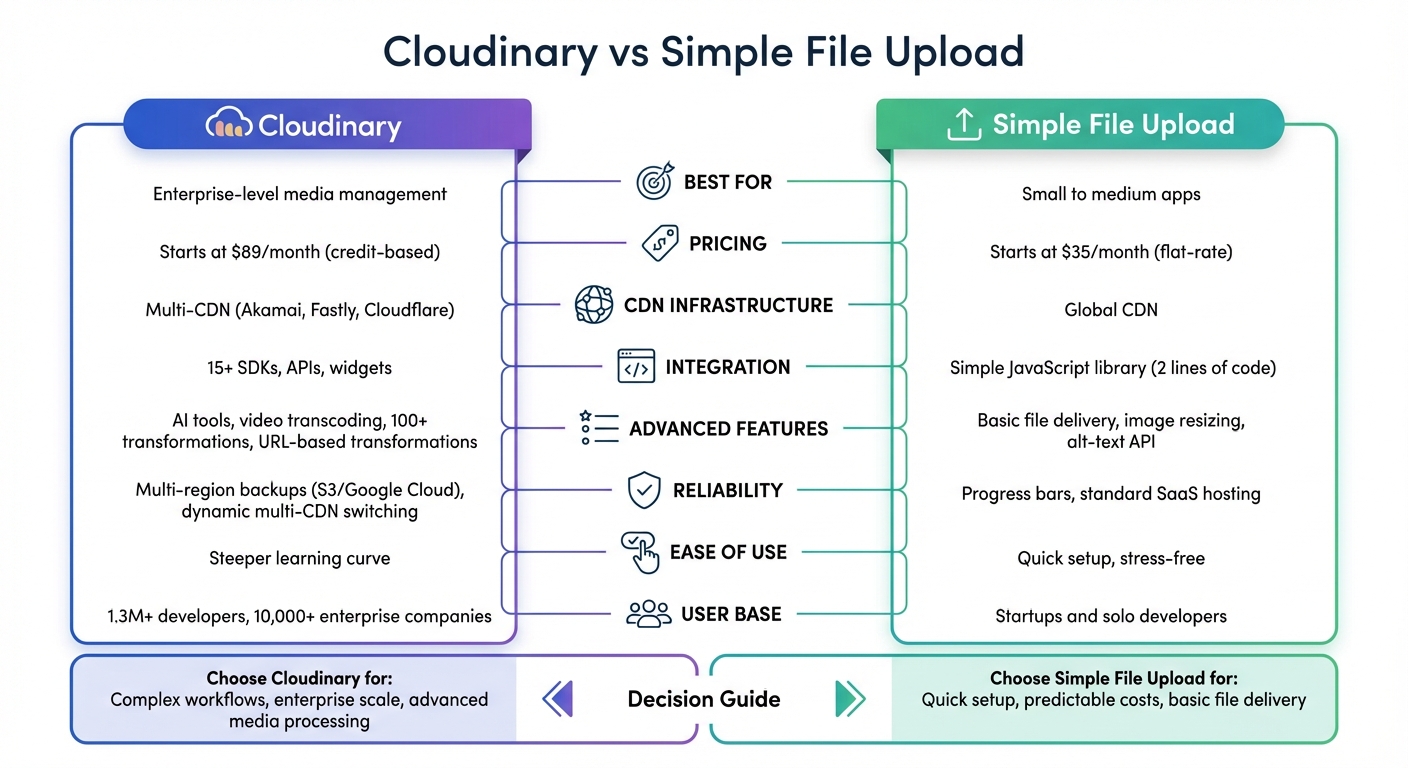
Cloudinary vs Simple File Upload: Feature and Pricing Comparison
1. Cloudinary

File Delivery Features
Cloudinary uses a global CDN network powered by Akamai, Fastly, and Cloudflare to deliver media from edge servers closest to your users, ensuring fast and efficient file delivery. One standout feature is its URL-based transformation capability, which allows you to resize, crop, or apply effects by tweaking simple URL parameters. For instance, changing w_500 to w_800 in the URL instantly adjusts the image width.
The platform also optimizes formats and quality automatically with parameters like f_auto and q_auto, reducing file sizes while maintaining visual quality. This approach means you can upload a single high-quality original file and generate countless variations on-demand, eliminating the need to store multiple pre-rendered versions. Supporting over 100 types of image and video transformations, Cloudinary is trusted by more than 1.3 million developers and 10,000 enterprise companies.
Pricing
Cloudinary uses a credit-based pricing system where one credit equals 1,000 transformations, 1 GB of managed storage, or 1 GB of viewing bandwidth. The free tier provides 25 monthly credits, which is ideal for smaller projects but may not be sufficient as your traffic scales. Paid plans include the Plus tier at $89/month (225 credits), the Advanced tier at $224/month (600 credits), and custom Enterprise options for larger needs. Unlike traditional CDNs, Cloudinary only charges for "net" viewing bandwidth, meaning you won’t face additional fees for HTTPS traffic, international traffic, or TCP overheads.
Integration and Developer Support
Cloudinary goes beyond file delivery with tools designed to simplify developer workflows. It offers more than 15 SDKs for popular programming languages and frameworks like Node.js, Python, PHP, React, Next.js, and Flutter. Developers can also leverage RESTful APIs for uploading, searching, and managing assets, or use the VS Code extension to handle files directly within their coding environment. Customizable widgets make it easy to pull files from sources like Dropbox or Google Drive. Additionally, Cloudinary integrates seamlessly with major hosting services like Heroku and AWS Marketplace, as well as popular e-commerce platforms like Shopify and WordPress. While users give it a solid 4.5/5 rating on G2, some note that achieving full customization may require advanced developer skills.
Performance and Scalability
For enterprise users, Cloudinary offers dynamic multi-CDN switching, which uses real-time data to route traffic through the best-performing CDN based on geographic location and network conditions. To ensure updated assets are delivered without caching issues, Cloudinary includes a version component (v<timestamp>) in the URL. Paid plans also come with enhanced security features like signed URLs and token-based authentication to control media access.
Netlify Image CDN Vs Cloudinary CDN Vs Cloudflare CDN Vs Vercel Image API

2. Simple File Upload
Simple File Upload stands out by prioritizing ease of use and affordability for file delivery, offering a streamlined approach compared to Cloudinary's extensive feature set.
File Delivery Features
Simple File Upload uses a global CDN to ensure quick and reliable file delivery. Each file is assigned a unique cdnUrl, making access seamless. The platform allows on-the-fly image resizing by adding width and height parameters directly to the CDN URL. For instance, appending ?w=200&h=200 resizes an image to 200×200 pixels - no need to store multiple versions of the same file. Additionally, AI-powered tools like automatic alt-text generation and a Background Removal API enhance accessibility and improve visual presentation. Integration is straightforward, relying on a single JavaScript library and a <simple-file-upload> web component, which supports both single and multi-file uploads.
Pricing
Simple File Upload offers three subscription tiers:
- Basic: $35/month – Includes 25 GB of storage and a 5 MB max file size.
- Pro: $80/month – Provides 100 GB of storage and a 50 MB max file size.
- Enterprise: $250/month – Offers 500 GB of storage, redundancy, and personalized support.
More details are available on their website.
Integration and Developer Support
The platform provides detailed documentation, including guides for React and a REST API for various tasks, such as file deletion. Developers can use a change event listener on the <simple-file-upload> component to capture file data and retrieve the corresponding cdnUrl. Customizable attributes make it easy to define file types, maximum file sizes, and the number of files allowed per upload. Additionally, the uploader's design can be tailored to match your application's branding and localization needs.
Pros and Cons
A closer look at the features of each platform reveals their strengths and trade-offs.
Cloudinary stands out for enterprise-level media management, leveraging dynamic multi-CDN switching and multi-region backups across Amazon S3 and Google Cloud. This setup ensures exceptional reliability and performance. With over 1.3 million developers and 10,000 enterprise clients, it offers powerful AI-driven media transformations and advanced video transcoding capabilities.
On the other hand, Simple File Upload shines for its simplicity. Its "two lines of code" integration makes it incredibly quick to implement, and the straightforward, flat monthly pricing starting at $35 for the Basic plan makes cost forecasting hassle-free. This budget-friendly approach caters particularly well to small and medium-sized applications. However, unlike Cloudinary’s credit-based pricing, Simple File Upload lacks the multi-CDN redundancy that larger enterprises often need.
Cloudinary’s pricing model, based on a rolling 30-day window of metrics, can make costs harder to predict. In contrast, Simple File Upload’s flat pricing is more transparent but less equipped for enterprise-level reliability.
| Criterion | Cloudinary | Simple File Upload |
|---|---|---|
| Primary Strength | Advanced AI-driven media optimization and multi-CDN delivery | Extreme simplicity and quick setup |
| CDN Infrastructure | Multi-CDN (Akamai, Fastly, Cloudflare) with dynamic switching | Global CDN |
| Reliability Features | Multi-region S3/Google Cloud backups | Progress bars and reputable SaaS hosting |
| Ease of Use | Steeper learning curve due to extensive features | High; designed for "stress-free" setup |
| Pricing Model | Credit-based (Transformations/Storage/Bandwidth) | Flat monthly fee starting at $35/mo |
| Best For | Enterprise-scale media management and complex transformations | Small to medium apps needing easy HTML file uploads |
Developers have shared their experiences with these platforms.
David Lien, VP of Engineering at Minted, remarked, "Cloudinary simplified our complex product image generation pipeline. The process is more performant, less error-prone, and requires significantly less manual overhead".
This feedback underscores Cloudinary’s strength for handling intricate workflows, while Simple File Upload appeals to developers who prioritize speed and ease of use.
Conclusion
Deciding between Cloudinary and Simple File Upload comes down to the size and requirements of your project. Cloudinary is designed for large-scale, enterprise-level media management. It offers advanced tools and features that handle complex workflows and high media volumes seamlessly.
On the other hand, Simple File Upload focuses on speed and ease of use. With its simple two-line code integration and flat monthly pricing starting at $35, it removes setup hassles and provides predictable costs. This makes it an excellent choice for startups, solo developers, or smaller projects where getting a functional uploader up and running quickly takes priority over advanced media processing.
When it comes to pricing, Cloudinary's credit-based system offers flexibility but requires close monitoring to avoid unexpected costs. Meanwhile, Simple File Upload’s flat-rate pricing ensures transparency, with its Basic plan including a 5MB file size limit.
For large, complex media workflows, Cloudinary is the better fit. If you’re looking for a straightforward, reliable file uploader without the need for intricate media management, Simple File Upload is the way to go.
Choose Cloudinary for robust media processing and scalability, or opt for Simple File Upload for an efficient, cost-effective solution.
FAQs
How does Simple File Upload differ from Cloudinary for file delivery?
Simple File Upload is all about making file uploading a breeze for developers. It provides an easy-to-use file uploader that integrates smoothly into web applications. With features like AI-powered alt-text generation, image transformations, and delivery through a global CDN, it takes care of file uploading, storage, and distribution in one neat package. Plus, it works seamlessly with popular frameworks and programming languages.
While Cloudinary is a big name in the space, Simple File Upload caters to developers who want a no-fuss, reliable solution for managing files. Its focus on simplicity and efficiency makes it a great choice for quickly adding file handling to your projects without unnecessary complications.
How does Cloudinary’s pricing model impact cost predictability?
Cloudinary’s pricing structure can impact how consistent your costs are, largely depending on your usage patterns and specific requirements. While exact pricing details aren't outlined here, many file delivery platforms rely on tiered or usage-based models. This means costs can vary significantly if your file storage or delivery needs change frequently.
For those aiming to maintain more predictable expenses, it's important to familiarize yourself with the pricing framework and keep a close eye on your usage to avoid unexpected charges.
What is the best platform for small to medium-sized projects?
When choosing a platform for small to medium-sized projects, it all comes down to your specific needs - things like your budget, must-have features, and how smoothly it integrates with your existing tools. With so many options for file delivery out there, it’s not always clear which one fits projects of this size best.
For a straightforward, developer-friendly option, look for platforms that check a few key boxes: simple integration, flexible pricing, and core features such as file storage, file transformation, and delivery via a global CDN. Taking the time to assess what your project truly needs will point you toward the right solution.
Related Blog Posts
Ready to simplify uploads?
Join thousands of developers who trust Simple File Upload for seamless integration.