Resumable Uploads: Progress Tracking Basics

Resumable uploads let you transfer files in chunks, making it easier to recover from interruptions. The server tracks the uploaded data using an offset, allowing uploads to resume without starting over. This method is especially useful for large files or unstable networks and ensures reliability by dividing files into manageable chunks.
Key Takeaways:
- Progress Tracking: Keeps users informed with real-time updates (e.g., progress bars or percentages) and ensures uploads resume accurately after failures.
- How It Works: Uploads are sent in chunks, with the server confirming received data. Tools like
XMLHttpRequestsupport tracking, while server-side checks ensure accuracy. - Error Handling: Common issues like network failures or session expiration are addressed with techniques like offset verification, retries, and checksum validation.
- User Interface: Clear progress indicators (linear or circular) and controls (pause, resume, cancel) improve the upload experience.
For developers, resumable uploads simplify large file transfers, reduce data loss, and improve user satisfaction. Platforms like Simple File Upload streamline the process by automating chunking, error recovery, and progress tracking.
How Progress Tracking Works in Resumable Uploads
Chunk-Based Uploads and Progress Calculation
Tracking upload progress involves comparing the number of bytes already stored on the server to the total file size. The formula for this is straightforward: (bytesUploaded / bytesTotal) * 100. To handle large files efficiently, they are divided into chunks, typically ranging from 5 to 50 MB, which are then uploaded sequentially. The server keeps track of an upload offset, which acts as the definitive reference for calculating progress.
Protocols like TUS and Google's resumable API rely on the Content-Range header to specify which portion of the file is being uploaded. For example, a header like bytes 0-524287/2000000 indicates that the chunk contains the first 524,288 bytes of a 2 MB file. Many APIs also enforce chunk sizes as multiples of 256 KB, though the final chunk can be smaller.
This structured approach ensures accurate progress tracking and enables real-time updates for the client.
Client-Side Progress Events
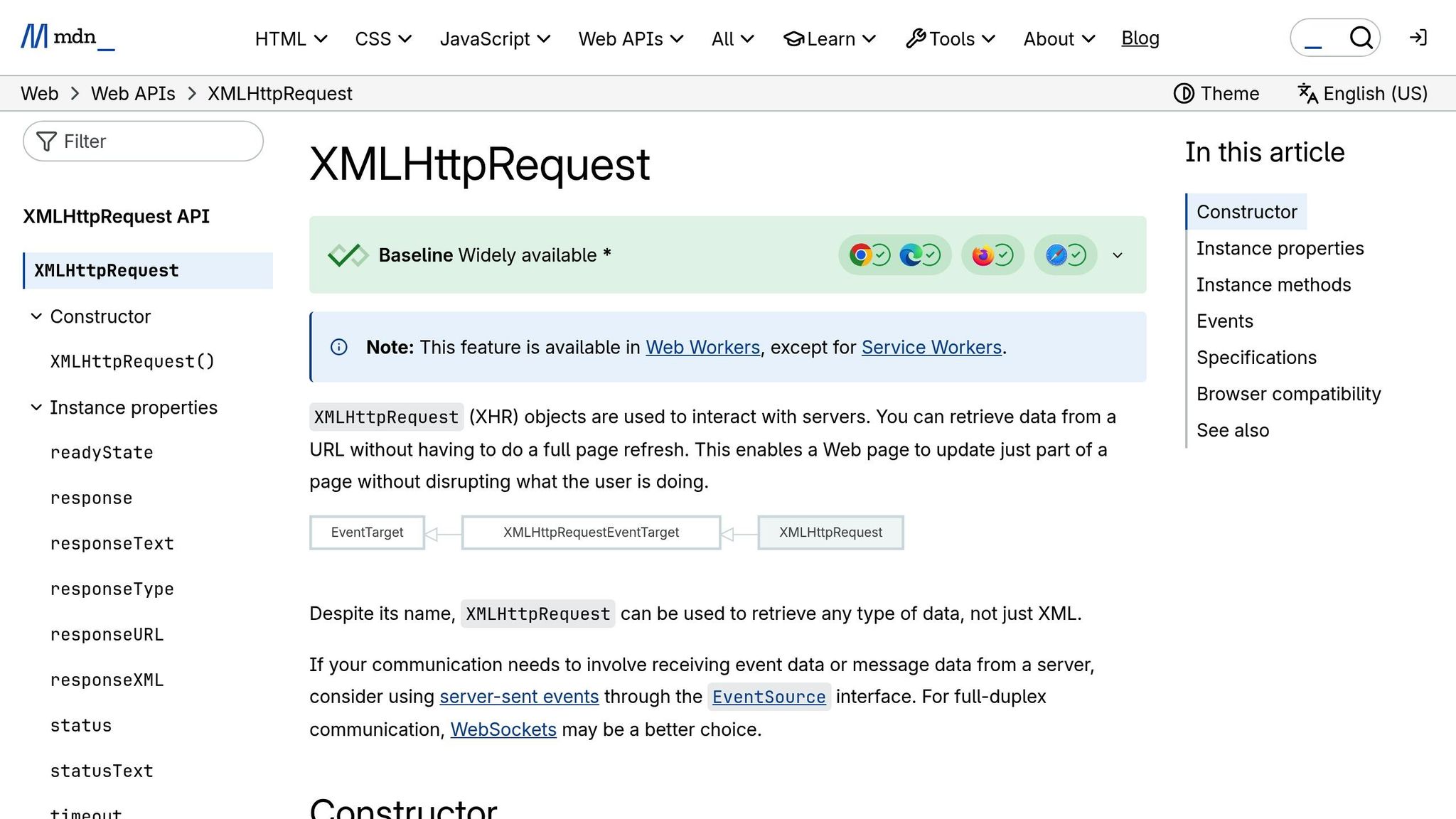
On the client side, progress events provide real-time feedback, such as progress bars or percentage indicators, to keep users informed. The XMLHttpRequest.upload object emits progress events with key properties like:
lengthComputable: Indicates whether the total upload size is known.loaded: The number of bytes already uploaded.total: The total number of bytes to be uploaded.
However, these events only monitor data as it leaves the browser. They don't account for the server's actual upload state, so they can't be used to determine the resume point after an interruption.
For accurate progress tracking and resumption, it's recommended to use XMLHttpRequest instead of the fetch API, as the former supports upload progress monitoring. If an upload is interrupted, the client must query the server to retrieve the current offset and use File.slice(startByte) to resume uploading only the remaining data. These events are crucial for creating responsive HTML file uploads, especially during lengthy file transfers.
Server-Side Reporting and Verification
While client-side monitoring is helpful, the server is the ultimate authority in confirming how much data has been successfully uploaded. Before resuming an interrupted upload, the client must query the server for the current offset to ensure it picks up from the right spot.
"To resume upload, we need to know exactly the number of bytes received by the server. And only the server can tell that." - Ilya Kantor, Author, JavaScript.info
When a chunk is received but the upload isn't complete, servers often respond with a 308 Resume Incomplete status code. The server's offset must always move forward - if any upload state is lost, the server should terminate the session entirely to avoid data corruption. Once the upload is complete, the server performs integrity checks, such as verifying an MD5 checksum, to confirm the file's accuracy.
Resumable Multi-File Uploader using XMLHttpRequest, NodeJs Express and Busboy
Error Handling and Upload Resumption
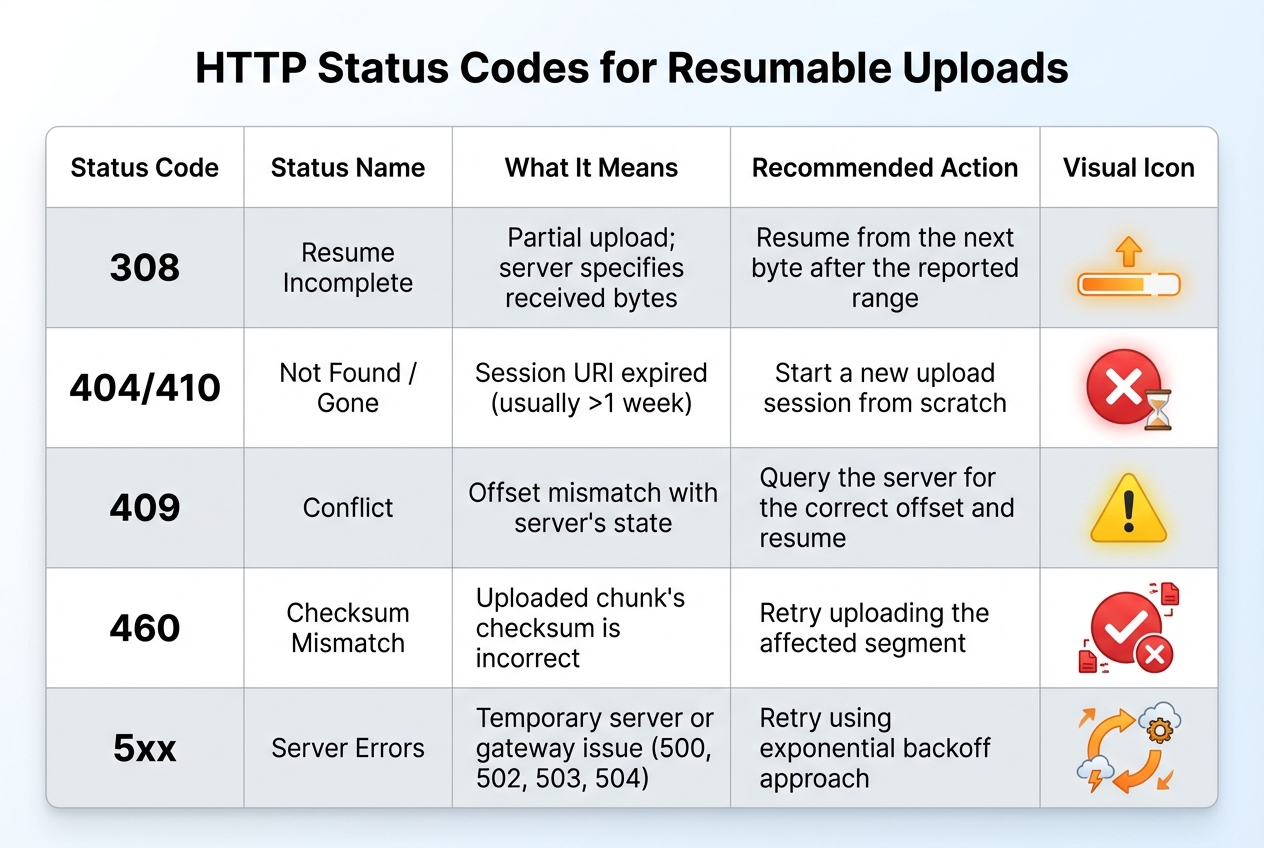
HTTP Status Codes for Resumable Upload Error Handling
Handling errors effectively ensures that uploads can recover smoothly, minimizing disruptions and maintaining progress.
Common Upload Errors
Several issues can interrupt uploads, including network problems, server-side failures, session expiration, and checksum mismatches.
- Network and communication errors often result from dropped connections, timeouts, or unstable networks.
- Server-side errors such as
500 Internal Server Error,502 Bad Gateway,503 Service Unavailable, and504 Gateway Timeoutsuggest temporary issues. These usually allow uploads to resume later. - Session expiration happens when resumable session URIs become invalid - typically after about one week. In such cases, the server returns a
404 Not Foundor410 Goneresponse. - Checksum mismatches occur when the uploaded data doesn't align with the source file's checksum. This is flagged with errors like
460 Checksum Mismatch. - A
409 Conflictindicates a mismatch between the byte offset sent by the client and the server's recorded progress, requiring correction before resuming.
| HTTP Status Code | Meaning | Recommended Action |
|---|---|---|
| 308 Resume Incomplete | Partial upload; server specifies received bytes | Resume from the next byte after the reported range |
| 404 Not Found / 410 Gone | Session URI expired (usually >1 week) | Start a new upload session from scratch |
| 409 Conflict | Offset mismatch with server's state | Query the server for the correct offset and resume |
| 460 Checksum Mismatch | Uploaded chunk's checksum is incorrect | Retry uploading the affected segment |
| 5xx (500, 502, 503, 504) | Temporary server or gateway issue | Retry using an exponential backoff approach |
Error Recovery Techniques
When facing server errors (5xx), use an exponential backoff strategy to space out retries. For example, wait 3 seconds before the first retry, 5 seconds before the next, and so on. This reduces server strain and increases the likelihood of success.
To ensure data integrity, include a checksum (like MD5 or SHA1) in request headers such as Content-MD5. This helps confirm that the uploaded file matches the original.
Before resuming an interrupted upload, send an empty PUT or a HEAD request to the session URI to check the server's status. A 308 Resume Incomplete response will include a Range or Upload-Offset header, indicating where to continue. If the session URI has expired (404 or 410), start a new upload session.
"If the intended recipient can indicate how much of the data was received prior to interruption, a sender can resume data transfer at that point instead of attempting to transfer all of the data again." - IETF Draft, Resumable Uploads for HTTP
Resuming Interrupted Uploads
Once recovery techniques have been applied, you can resume the upload by determining the server's current offset. This involves querying the server to find out how many bytes were successfully received before the failure. Use this offset to restart the upload, sending only the remaining data via PATCH or PUT.
For file uploads in JavaScript, the Blob.slice() method allows you to send just the remaining portion of the file, starting from the server-reported offset. It's critical to store session URIs securely - losing them means starting the upload from scratch. To ensure the correct file is resumed, generate a unique fileId using the file name, size, and last modification date.
Some frameworks, like Apple’s URLSession, automatically support resumable uploads when the protocol allows it. Additionally, the tus.io Protocol offers a standardized way to handle resumable uploads. It uses a HEAD method to retrieve the Upload-Offset and includes a checksum extension for added reliability. For example, the client sends an Upload-Checksum header (sha1 Kq5sNclPz7QV2+lfQIuc6R7oRu0=). If the server detects a mismatch during a PATCH request, it responds with a 460 Checksum Mismatch, discards the corrupted chunk, and ensures data integrity.
Building a User Interface for Progress Tracking
A well-thought-out progress interface helps users understand waiting periods by providing clear visual cues and real-time updates.
Types of Progress Indicators
Linear progress bars are ideal for processes like large file uploads that take more than a few seconds. These bars fill horizontally from 0% to 100%, offering a clear visual representation of progress. For global uploads, place them prominently in the center of the screen. When managing multiple uploads, attach these bars to individual file cards for better context.
Circular progress indicators are better suited for quick tasks under five seconds or situations where space is limited. They fill a circular track from 0 to 360 degrees and work well in compact spaces like buttons, small cards, or mobile interfaces. Common use cases include "swipe to refresh" actions or initial loading states.
Use determinate indicators when the completion percentage is known. For tasks where this isn’t possible - like when the file size is unknown or the server hasn’t provided the total bytes - opt for indeterminate indicators. These often use pulsing or looping animations. For example, if the Content-Length header is missing, removing the value attribute from the <progress> element will trigger an indeterminate state. Many systems start with an indeterminate indicator and switch to determinate once the file size is confirmed by the server.
| Indicator Type | Best Use Case | Visual Behavior |
|---|---|---|
| Linear Determinate | Large file uploads, multi-step tasks | Fills from 0% to 100% along a fixed track |
| Linear Indeterminate | Background tasks with unknown timing | Grows and shrinks continuously along a track |
| Circular Determinate | Small uploads, item-specific actions | Fills a circular track from 0 to 360 degrees |
| Circular Indeterminate | Short waits (<5 seconds), button-level loading | Rotates or pulses on an invisible circular track |
These indicators set the stage for delivering real-time feedback, which is explored further below.
Real-Time Updates and Feedback
To monitor upload progress in real time, the XHR (XMLHttpRequest) method is a go-to solution since the Fetch API doesn’t support progress events. The xhr.upload.onprogress event is particularly useful, as it provides loaded (bytes sent) and total (total file size) data. With this, you can calculate the upload percentage using the formula (event.loaded / event.total) * 100.
For accessibility, use the <progress> element, which provides built-in semantics that assistive technologies understand. Enhance this by adding aria-label to describe the progress bar and aria-live="polite" to ensure screen readers announce updates without disrupting the user experience.
It’s important to note that onprogress measures data sent from the browser, which might not match what the server has received due to buffering or network proxies. For critical uploads, query the server for the exact Upload-Offset to align the UI with the server’s actual data. For more on resuming uploads and calculating progress from a specific offset, refer to earlier sections.
"A progress bar transforms this uncertainty into a clear, accessible experience that shows exactly how much of the upload is complete." - OpenReplay Blog
Handling Long Uploads
Long uploads demand more than just real-time updates - they need additional controls and clear messaging. For uploads lasting several seconds or more, include controls like "Cancel", "Pause", and "Resume" buttons. Use xhr.abort() to stop an upload and Blob.slice() to resume it from the last known byte. Display the current state - whether it’s uploading, paused, resuming, or complete - to avoid confusion.
User-friendly messaging is critical during interruptions. Replace generic error codes with helpful messages like "Connection lost. Retrying in 5 seconds..." or "Upload Complete!" paired with a visual confirmation like a checkmark. Incorporate color coding to signal different statuses: green for success, red for errors, and yellow or orange for paused or retrying states.
For very large files, show an estimated time remaining based on the current upload speed, and update this dynamically as conditions change. Always provide a final confirmation, such as an "Upload Complete!" message or a checkmark icon, to reassure users and build trust.
"The moment a user tries to upload a large file, the experience breaks. They click 'Upload,' the browser seems to hang, and they have no idea if it's working or broken. This is the exact moment you realize you need a progress bar." - carlc, Product Marketing Manager, Filestack
Using Simple File Upload for Resumable Uploads

Simplifying the process of resumable uploads is made easier with Simple File Upload, a platform designed to handle file uploads with efficiency and reliability.
What Is Simple File Upload?
Simple File Upload is a platform that simplifies file uploads, storage, and delivery through a global CDN. It provides pre-built components and APIs to help you create a reliable upload system with minimal effort.
Features for Resumable Uploads
Simple File Upload uses the TUS open protocol, which ensures reliable and resumable file transfers. Here’s how it works:
- Large files are automatically broken into smaller, manageable chunks.
- If an upload fails, only the affected chunk needs to be re-uploaded instead of starting over with the entire file.
- TUS session URLs remain valid for 24 hours, giving users plenty of time to resume interrupted uploads.
The platform also offers a dedicated JavaScript library (simple-file-upload.latest.js) and a <simple-file-upload> component. These tools include event listeners for real-time progress tracking, triggered by the change event, so you can easily update your UI to reflect upload progress.
Integration Example
Integrating Simple File Upload into your application is straightforward. Just add the <simple-file-upload> web component to your HTML and attach an event listener to track progress. The component handles error recovery and resuming uploads automatically. When a user selects a file, the change event provides details like bytes uploaded and total file size, which you can use to display progress in your UI.
Another benefit is the platform's direct upload feature, which sends files straight to storage without passing through your server. This approach can reduce bandwidth usage and speed up uploads. Files are then delivered through a global CDN, ensuring quick access for users no matter where they are.
For businesses with advanced needs, the Custom plan is available for $250/month. It includes 500GB of storage, a 50MB maximum file size, redundancy across multiple storage providers, and personalized integration support.
Conclusion
Recap of Progress Tracking Basics
Incorporating progress tracking into resumable uploads significantly improves the user experience during file transfers. By allowing uploads to pick up from where they left off after an interruption, this approach reduces data loss and idle time. Real-time progress indicators also play a key role in keeping users informed, lowering uncertainty, and reducing the likelihood of abandonment during lengthy uploads or when dealing with unstable mobile connections.
The TUS protocol has become a widely recognized standard for handling resumable uploads. Notably, as of January 6, 2026, new HTTP specifications have introduced the 104 (Upload Resumption Supported) status code along with headers like Upload-Offset and Upload-Length, which formalize resumable upload behavior. To ensure smooth performance, resumable uploads are especially useful for larger files, and the TUS protocol is ideal for managing extensive data transfers.
"Resumable uploads and progress indicators add a lot of value to web and mobile apps... these features save progress, time, and bandwidth by optimizing the upload process and reducing downtime and errors."
- Justin Hunter, Pinata
This structured approach provides a solid foundation for integrating tools that simplify the often complex upload process.
Streamlining Development with the Right Tools
Building resumable uploads from scratch can be challenging. Developers need to handle file chunking, track byte offsets on the server side, and implement retry mechanisms - all of which add layers of complexity. Platforms like Simple File Upload take the burden off developers by automating these tasks.
With Simple File Upload, you can focus on building your application instead of worrying about upload infrastructure. The platform takes care of error recovery, manages file chunks, and ensures session persistence. It also delivers real-time progress updates through simple event listeners, cutting down on development time and ensuring reliable uploads without requiring in-depth knowledge of resumable upload protocols.
FAQs
How do resumable uploads make large file transfers more reliable?
Resumable uploads make transferring large files much more dependable by breaking the upload into smaller, manageable chunks. Instead of sending the entire file in one go, each chunk is uploaded separately. If the network connection drops, the upload can pick up right where it left off, without starting over from scratch.
This approach tracks progress and retries any chunks that fail to upload, making the process smoother and more reliable. It’s especially helpful for users dealing with spotty internet connections or working with extremely large files.
How does the server help track upload progress in resumable uploads?
In resumable uploads, the server takes on the important task of keeping track of the upload's progress by maintaining the state of the upload session. When a client initiates an upload, the server generates a unique session URL and includes metadata such as the file's total size, content type, and expiration time. If the upload is interrupted, the client can use this session URL to check the exact byte offset of the data that has already been uploaded. This makes it possible to pick up the upload right where it left off, avoiding the need to resend previously uploaded data.
The server also plays a key role in ensuring smooth error recovery. It does this by rejecting chunks that arrive out of order, enforcing rules on chunk sizes, and keeping track of session expiration. This careful management not only supports accurate progress tracking on the client side but also ensures that resumable uploads work seamlessly. Simple File Upload adopts this method, making it easy for developers to show real-time progress and handle upload interruptions without hassle.
How can developers manage errors and resume interrupted uploads?
To handle errors and resume uploads efficiently, developers can split files into smaller chunks and use a unique session URL to monitor progress. This way, if an upload gets interrupted, the client can check with the server to see how much data has already been uploaded and continue from that point - eliminating the need to restart the process.
Here are some key strategies to make uploads more reliable:
- Store the session URL and progress locally: This ensures uploads can resume seamlessly, even if the page is reloaded.
- Retry failed chunks intelligently: Use exponential back-off for retries to avoid overwhelming the server with repeated requests.
- Validate data integrity: If supported, checksums can confirm that each chunk is uploaded correctly.
With Simple File Upload, this process becomes much easier. It automatically manages resumable sessions, tracks progress, and handles retries, freeing developers to focus on creating excellent user experiences.
Related Blog Posts
Ready to simplify uploads?
Join thousands of developers who trust Simple File Upload for seamless integration.